
Before You Begin
Prepare and review the applicable metric setup spreadsheet before beginning the import.
Use the How to Properly Configure a Source Environmental Metric Import Sheet to prepare a Source Environmental Metric configuration spreadsheet
Use the How to Properly Configure a Calculated Environmental Metric Import Sheet to prepare a Calculated Environmental Metric spreadsheet.
The workflow for importing Source and Calculated Environmental Metrics is the same. However, a Calculated Environmental Metric spreadsheet includes an additional Calculation column containing the calculation that will be configured for each metric.
Note: If a Calculated Environmental Metric depends on a Source Environmental Metric, import and verify the Source Environmental Metric first. The Source Environmental Metric must exist in EHS-Dashboard before its ID can be referenced by the Calculated Environmental Metric.
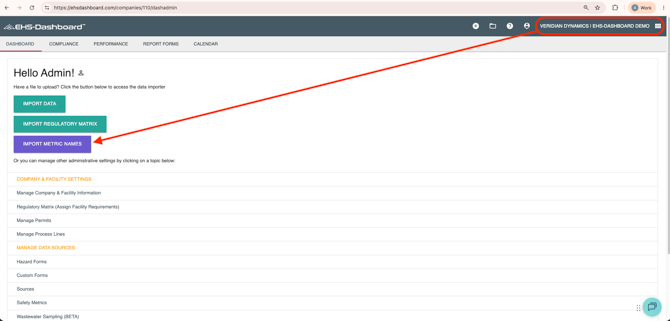
Step 1: Log Into EHS-Dashboard and Navigate to the Metric Importer
- Log into EHS-Dashboard.
- Navigate to the Admin section.
- Click IMPORT METRIC NAMES.
Step 2: Import the Metrics
- Choose the preconfigured Source Environmental Metric or Calculated Environmental Metric setup spreadsheet.
- Confirm that you selected the correct spreadsheet.
- Click Import.
Import Source and Calculated Environmental Metric spreadsheets separately.
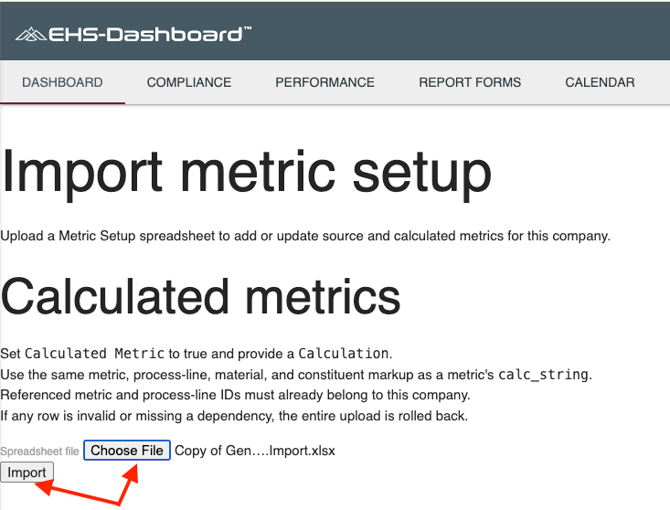
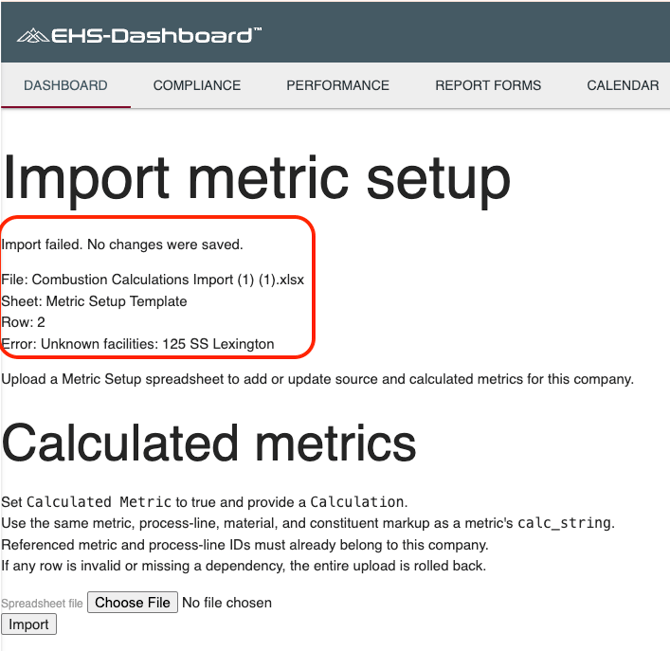
Note: The EHS-Dashboard does not currently display a success message after the import is completed. You must verify that the imported metrics appear in the Sources table.
If the spreadsheet contains unexpected or improperly formatted information, the EHS-Dashboard will display an error message. Review the spreadsheet, correct the identified information, and import it again.
Step 3: Verify the Import
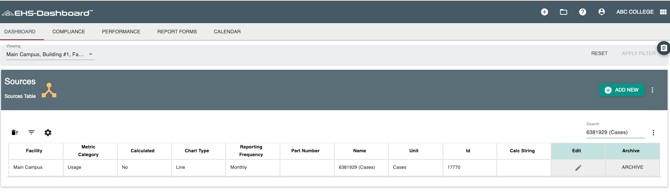
Because the importer does not display a success message, confirm the results from the Sources table.
- Navigate to the Admin section.
- Click Sources.
- Locate the imported metrics in the Sources table.
- Confirm that each expected metric is present.
- Review the imported metrics to verify that they were configured as expected.
For Source Environmental Metrics, verify the applicable:
- Facility
- Metric Category
- Metric Name
- Expected Input Type
- Unit of measure
- Reporting Granularity
- Chart settings
- Calculated Metric setting
For Calculated Environmental Metrics, also verify:
- Chemical Group, when applicable
- Calculation
- Referenced Source Environmental Metric or Process Line IDs
- Notes, when included
Outcome
Once imported and verified, the Source and Calculated Environmental Metrics are available in EHS-Dashboard with their assigned facilities, metric settings, and calculations. They can then be used to support environmental data entry, calculations, charting, and reporting.