
Step 1: Enter or Create a Workspace for Permit Tracking
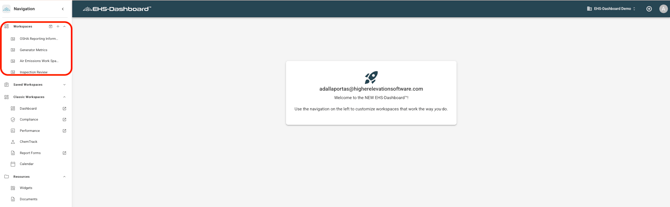
From the main dashboard, locate the Workspaces section.
Enter an existing Workspace designated for Permit Tracking, or click the + icon to create a new Workspace.
For detailed instructions on creating and managing Workspaces, refer to the How to Create a Workspace guide.
Step 2: Review Permit-Tracked Data
Navigate to the Permit or related tracked data records and review the information being collected through configured Emission Units and associated Process Lines.
Confirm that:
-
Material or metric data is being captured
-
The correct Permit is associated
-
Emission Units and thresholds are configured as expected
This helps ensure the data being displayed in a Workspace is complete and accurate.
Note: For instructions on configuring Permits, refer to the How to Configure Permits to Track Emissions and Operational Limits guide and for instructions on adding tracked material data, refer to the How to Track Chemical Usage, Storage & Waste Data and How to add Environmental Metrics Usage/Cost Records guides.
Step 3: Add Permit Tracking Widgets to a Workspace
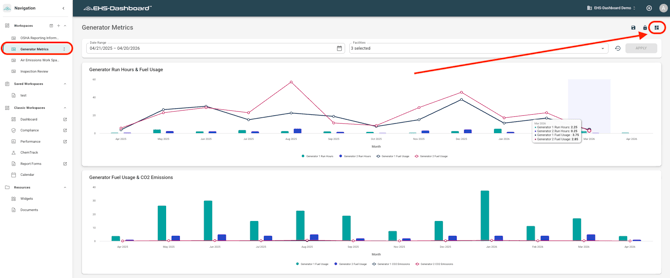
Create a new widget or select an existing widget that displays the Permit-related data you want to monitor. Then add that widget to the desired Workspace and arrange it as needed.
Examples of Permit-related data may include:
-
Emission Unit activity
-
Tracked material data
-
Tracked metric data
For detailed instructions on creating, adding, and arranging widgets, refer to the How to Create and Configure Widgets guide.
Step 4: Monitor Permit Data Over Time
Use the Workspace to review Permit-related activity on an ongoing basis.
This may include monitoring:
-
Tracked emissions-related material usage
-
Operational data against thresholds
-
Permit-specific trends over time
-
Data associated with individual Emission Units
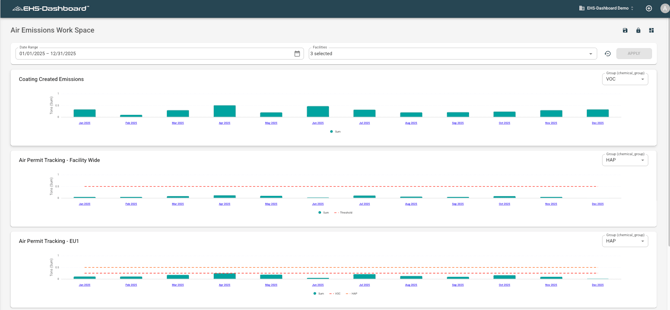
Workspaces make it easier to review Permit performance without manually searching through records.
Outcome
Permit Tracking Workspaces provide a centralized view of data associated with configured Permits, Emission Units, and thresholds. This supports ongoing monitoring of air permit compliance data and improves visibility into tracked operational and emissions-related activity.